
Project 7 · Natural Language Processing · Full beginner handbook
Can AI Detect a Real Disaster Tweet? Build a Text Classifier
One student types 'I am drowning in homework' and another reports 'Floodwater is entering homes.' Both mention disaster-like words. Can AI distinguish ordinary metaphors from disaster-related language? It cannot prove a disaster happened.
What you will build
A real TF-IDF NLP pipeline comparing Logistic Regression and Naive Bayes, with cleaning, duplicate protection, stratified train/validation/test, threshold selection, metrics and a working Streamlit text classifier.
Exact tools you will use
Python 3.12, VS Code, Kaggle Disaster Tweets train.csv (accept official competition terms), pandas, scikit-learn, TF-IDF, Logistic Regression, Naive Bayes, Streamlit, pytest

Real application evidence
Genuine full-page desktop and mobile screenshots captured from a running Streamlit app by GitHub Actions. The captured NLP app is trained only on an original fictional 40-example smoke-test fixture, explicitly labelled in the screenshot; official Kaggle training must be completed by the learner.
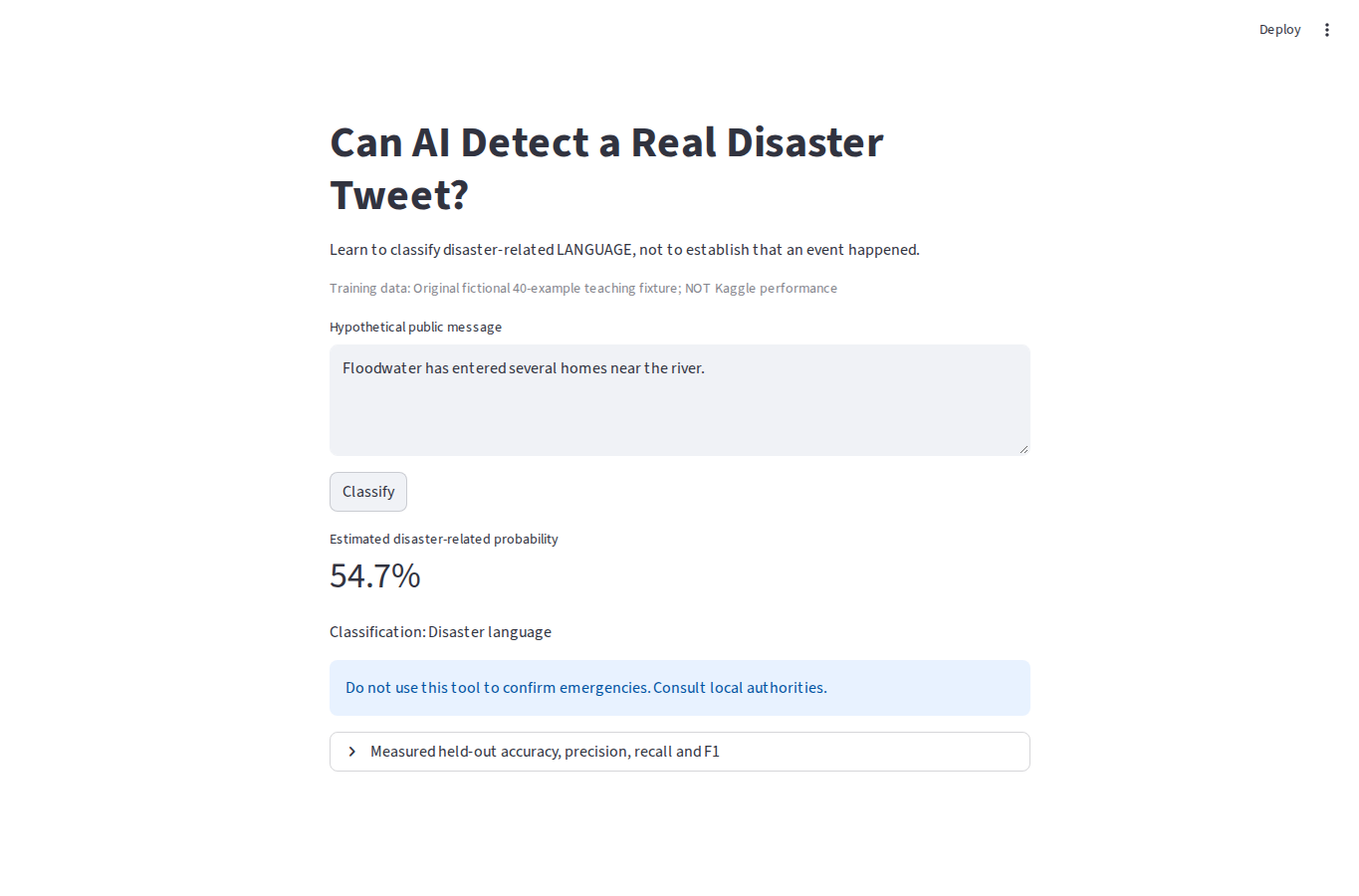
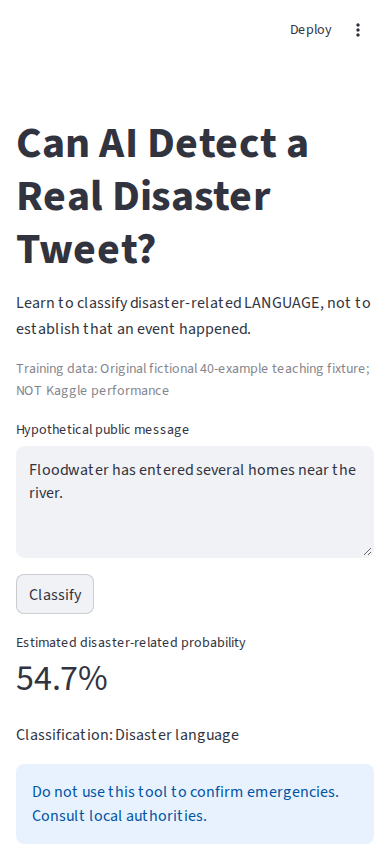
Calculate precision, recall and F1 step by step
- Suppose on a hypothetical evaluation: true positives TP = 8; false positives FP = 2; false negatives FN = 4; true negatives TN = 6.
- Precision = TP/(TP+FP) = 8/(8+2) = 0.80.
- Recall = TP/(TP+FN) = 8/(8+4) ≈ 0.667.
- F1 = 2×Precision×Recall/(Precision+Recall) ≈ 0.727.
- Why not accuracy alone? Disaster-like messages might be relatively rare and false alarms and misses have different costs.
Start with ambiguous language instead of jargon
Why: Words like fire, flood, crush and storm appear in both emergencies and jokes.
Do this: Open VS Code → File → Open Folder → projects/disaster-tweets; inspect src/detect.py and the README.
Check: You can describe what 0 and 1 represent, without claiming to verify the truth of the tweet.
Prepare Python
Why: Keep library environments isolated and reproducible.
Do this: Open Terminal → New Terminal, create a virtual environment and install project requirements.
python -m venv .venv
# Windows: .venv\Scripts\activate
# macOS/Linux: source .venv/bin/activate
python -m pip install -r requirements.txt
Check: pytest and scikit-learn import successfully.
Get real competition data legally
Why: Reproducibility includes dataset licensing and provenance.
Do this: Go to the official Kaggle Natural Language Processing with Disaster Tweets competition, sign in, accept the competition rules, download train.csv into data/train.csv. Never commit the data.
Check: train.csv has text, target and usually id, keyword, location fields.
Clean and split without duplicate leakage
Why: Copies of the same message in train and test make accuracy appear better.
Do this: Keep negations such as not. Strip links/handles, remove conflicting and identical normalized messages, then stratify into train, validation and test.
Check: No normalized text appears in two splits.
Represent language with TF-IDF and compare models
Why: TF-IDF scales word importance; one- and two-word expressions preserve some context.
Do this: Use logistic regression and Naive Bayes to estimate P(disaster-related). Select threshold and model by validation F1, not by test outcomes.
Check: Threshold was selected without inspecting final test labels.
Evaluate, classify and discuss safety
Why: False positives and false negatives both matter; a model is not an emergency authority.
Do this: Run offline tests, train on the actual Kaggle file, then start the app. Inspect accuracy, precision, recall, F1 and confusion matrix.
python -m pytest -q
python train.py
python -m streamlit run app.py
Check: Local app responds to hypothetical text and explicitly cautions that labels do not establish real events.
Limitations you should understand
This is language classification and not a real-time emergency, source-verification or public warning tool. Competition data cannot be redistributed. CI tests use an explicitly fictional local teaching fixture, not official Kaggle performance.
Complete source code — copy every file
This is the exact code used in the repository, loaded directly as raw source in the website build. Each file below is complete, not abbreviated. Create the named file inside the project folder, paste it, and then run the commands above.
README.md
# Project 7 — Can AI Detect a Real Disaster Tweet?

## Practical hook
Someone posts "I am drowning in paperwork." Another posts "Floodwater has entered several homes." Which one describes an emergency? A machine learning classifier can learn language patterns, but it cannot establish whether an event really occurred. Build a reproducible NLP pipeline and inspect its mistakes.

## Tools and official dataset
Python 3.12, VS Code, pandas, scikit-learn, TF-IDF, Naive Bayes, Logistic Regression, Streamlit and pytest. Use Kaggle competition "Natural Language Processing with Disaster Tweets" (https://www.kaggle.com/competitions/nlp-getting-started/data). You must sign in and accept any competition rules to download train.csv. We do not redistribute competition content.

## Exact student steps
1. Install Python and VS Code. Select File → Open Folder → projects/disaster-tweets.
2. Open Terminal → New Terminal. Create an environment with python -m venv .venv.
3. Activate on Windows with .venv\Scripts\activate, or macOS/Linux with source .venv/bin/activate.
4. Install dependencies using python -m pip install -r requirements.txt.
5. Run python -m pytest -q. These tests use an original fictional 40-example fixture for code validation, NOT actual Kaggle accuracy.
6. On the Kaggle competition page accept the rules, download the dataset ZIP, and extract train.csv to data/train.csv in this project folder.
7. Run python train.py. It cleans text, deduplicates, separates train/validation/test, trains TF-IDF models and chooses model and probability threshold on validation F1.
8. Inspect artifacts/metrics.json. Compare confusion matrix, precision and recall against the majority baseline. Test data is never used to select the model.
9. Run python -m streamlit run app.py. Open the displayed localhost address, type a non-sensitive example message and press Classify.
10. Review false positives and false negatives from artifacts/test_predictions.csv. Consider changes without continuously tuning against the held-out test.

## Worked numbers
Suppose TP=8, FP=2, FN=4, TN=6. Precision = 8/(8+2) = 0.8. Recall = 8/(8+4) ≈ 0.667. F1 = 2×0.8×0.667/(0.8+0.667) ≈ 0.727. A model must balance missing real disaster-related posts against incorrectly labeling jokes or metaphors.

## Important safeguards
The model is a text classifier, NOT an emergency system, fact checker or live news verifier. It may misread figurative language, misinformation, dialect or rare words. Keep the negation "not" in cleaning. Exact duplicate texts are removed before splitting to avoid leakage. No saved user tweets are uploaded. Never load untrusted joblib files.

## Study questions
What is a TF-IDF score? Why does a bigram such as "not flooding" contain more context than the word "flood"? What happens to precision and recall as we lower the decision threshold? Which cases need human review? Understand every line of src/detect.py, train.py, app.py and the unit tests.
requirements.txt
numpy>=1.26,<3
pandas>=2.2,<3.1
scikit-learn>=1.5,<2
joblib>=1.4,<2
streamlit>=1.37,<2
pytest>=8,<10
src/detect.py
"""Disaster tweet classification with deduplication, validation selection, holdout test.

Kaggle competition data must be downloaded by the learner, respecting its rules.
"""
from pathlib import Path
import json
import re

import joblib
import numpy as np
import pandas as pd
from sklearn.dummy import DummyClassifier
from sklearn.feature_extraction.text import TfidfVectorizer
from sklearn.linear_model import LogisticRegression
from sklearn.naive_bayes import MultinomialNB
from sklearn.metrics import accuracy_score, precision_score, recall_score, f1_score, confusion_matrix
from sklearn.model_selection import train_test_split
from sklearn.pipeline import Pipeline

ROOT = Path(__file__).resolve().parents[1]
SEED = 42

def clean_text(text):
    if not isinstance(text, str) or len(text) > 2000:
        raise ValueError("Expected text of at most 2000 characters")
    text = re.sub(r"https?://\S+|www\.\S+", " ", text, flags=re.I)
    text = re.sub(r"(?<!\w)@\w+", " ", text)
    return re.sub(r"\s+", " ", text.replace("#", " ").lower()).strip()

def validate_data(df):
    if not {"text", "target"}.issubset(df.columns):
        raise ValueError("Missing Kaggle train.csv text or target column")
    rows = df[["text", "target"]].copy()
    if rows.isna().any().any() or not rows.target.isin([0, 1]).all():
        raise ValueError("Missing/invalid text or labels (must be 0 or 1)")
    rows["text"] = rows.text.map(clean_text)
    rows = rows.loc[rows.text.str.len() > 0].copy()
    conflicting = rows.groupby("text").target.nunique()
    rows = rows.loc[~rows.text.isin(conflicting[conflicting > 1].index)]
    rows = rows.drop_duplicates(subset=["text"]).reset_index(drop=True)
    if len(rows) < 35 or rows.target.value_counts().min() < 15:
        raise ValueError("At least 35 unique samples with 15 per class required")
    return rows

def split_rows(rows):
    trainval, test = train_test_split(rows, test_size=.15, random_state=SEED, stratify=rows.target)
    train, val = train_test_split(trainval, test_size=.17647058823529413, random_state=SEED,
                                  stratify=trainval.target)
    assert not (set(train.text) & set(val.text) or set(val.text) & set(test.text)
                or set(train.text) & set(test.text))
    return train, val, test

def candidates():
    vec = dict(lowercase=False, ngram_range=(1, 2), min_df=1, max_df=1.0,
               strip_accents="unicode", sublinear_tf=True)
    return {
        "LogisticRegression": Pipeline([
            ("tfidf", TfidfVectorizer(**vec)),
            ("model", LogisticRegression(max_iter=1000, class_weight="balanced", random_state=SEED))
        ]),
        "MultinomialNB": Pipeline([
            ("tfidf", TfidfVectorizer(**vec)),
            ("model", MultinomialNB(alpha=1.0))
        ]),
    }

def metrics(truth, probability, threshold=.5):
    if not 0 <= threshold <= 1:
        raise ValueError("Threshold must lie within [0,1]")
    predicted = np.asarray(probability) >= threshold
    return {
        "accuracy": float(accuracy_score(truth, predicted)),
        "precision": float(precision_score(truth, predicted, zero_division=0)),
        "recall": float(recall_score(truth, predicted, zero_division=0)),
        "f1": float(f1_score(truth, predicted, zero_division=0)),
        "matrix": confusion_matrix(truth, predicted, labels=[0, 1]).tolist(),
    }

def train_and_evaluate(df, dest, source_label="Original fictional 40-example teaching fixture; NOT Kaggle performance"):
    rows = validate_data(df)
    train, val, test = split_rows(rows)
    candidates_eval = []
    for name, candidate in candidates().items():
        candidate.fit(train.text, train.target)
        prob = candidate.predict_proba(val.text)[:, 1]
        for threshold in (.3, .4, .5, .6, .7):
            candidates_eval.append({"name": name, "threshold": threshold,
                                    **metrics(val.target, prob, threshold)})
    winner = max(candidates_eval,
                 key=lambda r: (r["f1"], r["recall"], -abs(r["threshold"] - .5)))
    trainval = pd.concat([train, val])
    fitted = candidates()[winner["name"]].fit(trainval.text, trainval.target)
    test_prob = fitted.predict_proba(test.text)[:, 1]
    baseline = DummyClassifier(strategy="most_frequent").fit(
        np.arange(len(trainval)).reshape(-1, 1), trainval.target)
    baseline_prob = baseline.predict(np.arange(len(test)).reshape(-1, 1))
    report = {
        "dataset": source_label,
        "split": {"train": len(train), "validation": len(val), "test": len(test)},
        "cleaned_n": len(rows),
        "chosen_from_validation": {"model": winner["name"], "threshold": winner["threshold"],
                                   "f1": winner["f1"], "recall": winner["recall"]},
        "test": metrics(test.target, test_prob, winner["threshold"]),
        "test_majority_baseline": metrics(test.target, baseline_prob),
        "safety": "Language classification does not verify real disaster occurrence.",
    }
    dest = Path(dest)
    dest.mkdir(parents=True, exist_ok=True)
    joblib.dump({"pipeline": fitted, "threshold": winner["threshold"]}, dest / "model.joblib")
    (dest / "metrics.json").write_text(json.dumps(report, indent=2) + "\n", encoding="utf-8")
    pd.DataFrame({"text": test.text, "actual": test.target, "probability": test_prob}).to_csv(
        dest / "test_predictions.csv", index=False)
    return report

def classify(bundle, text):
    cleaned = clean_text(text)
    if not cleaned:
        raise ValueError("Enter a nonempty message")
    prob = float(bundle["pipeline"].predict_proba([cleaned])[0, 1])
    return {"probability": prob, "predicted": int(prob >= bundle["threshold"])}
train.py
"""Download official train.csv from Kaggle yourself before running."""
import pandas as pd
from src.detect import ROOT, train_and_evaluate

source = ROOT / "data" / "train.csv"
if not source.is_file():
    raise SystemExit("Missing data/train.csv; download it from the official Kaggle competition.")
report = train_and_evaluate(pd.read_csv(source), ROOT / "artifacts",
    source_label="Official Kaggle Disaster Tweets, user-downloaded train.csv (competition rules apply)")
print("Selected on validation:", report["chosen_from_validation"])
print("Untouched test:", report["test"])
app.py
"""Educational Streamlit app. Not an emergency alert system."""
from pathlib import Path
import json

import joblib
import streamlit as st
from src.detect import classify

ROOT = Path(__file__).resolve().parent
st.set_page_config(page_title="Disaster Tweet Detector")
st.title("Can AI Detect a Real Disaster Tweet?")
st.write("Learn to classify disaster-related LANGUAGE, not to establish that an event happened.")
if not (ROOT / "artifacts" / "model.joblib").exists():
    st.warning("Download Kaggle data/train.csv and run python train.py first.")
    st.stop()

report = json.loads((ROOT / "artifacts" / "metrics.json").read_text())
st.caption("Training data: " + report["dataset"])

@st.cache_resource
def bundle():
    # Load only local self-produced trusted training artifacts.
    return joblib.load(ROOT / "artifacts" / "model.joblib")

message = st.text_area("Hypothetical public message", max_chars=2000, height=140)
if st.button("Classify"):
    try:
        result = classify(bundle(), message)
        st.metric("Estimated disaster-related probability", f"{result['probability']:.1%}")
        st.write("Classification:", "Disaster language" if result["predicted"] else "Not disaster language")
        st.info("Do not use this tool to confirm emergencies. Consult local authorities.")
    except ValueError as error:
        st.error(str(error))
with st.expander("Measured held-out accuracy, precision, recall and F1"):
    st.json(json.loads((ROOT / "artifacts" / "metrics.json").read_text()))
tests/test_detect.py
import pandas as pd
import pytest
from src.detect import clean_text, validate_data, split_rows, train_and_evaluate, classify, metrics

EXAMPLES = [
    ("Wildfire forces families to evacuate their village", 1),
    ("Floodwater has entered several riverside homes", 1),
    ("Rescue workers searching collapsed buildings after quake", 1),
    ("Firefighters battle spreading forest fires", 1),
    ("Earthquake severely damaged nearby schools", 1),
    ("Tornado tore through the town", 1),
    ("Emergency evacuation in progress after hurricane", 1),
    ("Landslide blocked road and trapped motorists", 1),
    ("Factory explosion injured several people", 1),
    ("Flood alerts issued for low lying areas", 1),
    ("Ambulance crews arrive after traffic collision", 1),
    ("Storm surge leaves coastal houses underwater", 1),
    ("A bridge collapsed during the storm", 1),
    ("Multiple homes destroyed by major wildfire", 1),
    ("Police report injuries after train derailment", 1),
    ("Residents seek shelter following volcanic eruption", 1),
    ("Rescue helicopters sent after mountain avalanche", 1),
    ("Heavy rains triggered dangerous mudslides", 1),
    ("Tsunami warning activated along eastern coastline", 1),
    ("Emergency workers distributing supplies after cyclone", 1),
    ("That math exam was a total disaster", 0),
    ("I am drowning in coursework this week", 0),
    ("The game was absolutely explosive entertainment", 0),
    ("This joke killed me with laughter", 0),
    ("I am on fire with ideas today", 0),
    ("Our group chat was flooded with memes", 0),
    ("The team crushed every sales target", 0),
    ("My phone blew up with notifications", 0),
    ("That movie caused a storm of debate", 0),
    ("The party erupted into loud cheers", 0),
    ("My work calendar is an avalanche", 0),
    ("This song set the dance floor on fire", 0),
    ("The shop is running a fire sale", 0),
    ("My schedule is packed with meetings", 0),
    ("A flood of birthday wishes reached me", 0),
    ("The show was an emotional roller coaster", 0),
    ("I crashed onto the couch after work", 0),
    ("The opening performance was electric", 0),
    ("Your story blew my mind completely", 0),
    ("My online post is going viral today", 0),
]

def examples():
    return pd.DataFrame(EXAMPLES, columns=["text", "target"])

def test_preserve_negation_and_remove_handles():
    assert clean_text("NOT a #flood @account https://example.org") == "not a flood"
    with pytest.raises(ValueError):
        clean_text("x" * 2001)

def test_conflicting_duplicate_excluded_and_splits_disjoint():
    df = examples()
    df.loc[40] = [EXAMPLES[0][0], 0]
    rows = validate_data(df)
    assert clean_text(EXAMPLES[0][0]) not in set(rows.text)
    train, val, test = split_rows(rows)
    assert not (set(train.text) & set(val.text) or set(train.text) & set(test.text))

def test_train_predict_and_saved_results(tmp_path):
    report = train_and_evaluate(examples(), tmp_path)
    assert report["split"]["test"] > 0
    assert (tmp_path / "model.joblib").is_file()
    import joblib
    saved = joblib.load(tmp_path / "model.joblib")
    output = classify(saved, "Floodwater entered multiple homes")
    assert 0 <= output["probability"] <= 1
    assert output["predicted"] in (0, 1)

def test_valid_metrics_and_schema():
    assert metrics([0, 1], [0.1, .9])["f1"] == 1
    with pytest.raises(ValueError):
        validate_data(pd.DataFrame({"wrong": [0]}))
Project verification workflow
name: Three Remaining Projects — Engineering Verify
on:
  push:
    branches:
      - feat/complete-three-projects-20261009
  pull_request:
    paths:
      - 'projects/digit-recognizer/**'
      - 'projects/retail-forecasting/**'
      - 'projects/disaster-tweets/**'
      - 'src/pages/*ProjectPage.tsx'
      - 'src/data/projectPortfolio.ts'
      - '.github/workflows/three-projects-verify.yml'
  workflow_dispatch:

jobs:
  retail:
    runs-on: ubuntu-latest
    timeout-minutes: 15
    defaults:
      run:
        working-directory: projects/retail-forecasting
    steps:
      - uses: actions/checkout@v4
      - uses: actions/setup-python@v5
        with:
          python-version: '3.12'
          cache: pip
          cache-dependency-path: projects/retail-forecasting/requirements.txt
      - run: python -m pip install -r requirements.txt
      - run: python -m pytest -q
      - run: python -m compileall -q src train.py download_data.py app.py
  disaster:
    runs-on: ubuntu-latest
    timeout-minutes: 15
    defaults:
      run:
        working-directory: projects/disaster-tweets
    steps:
      - uses: actions/checkout@v4
      - uses: actions/setup-python@v5
        with:
          python-version: '3.12'
          cache: pip
          cache-dependency-path: projects/disaster-tweets/requirements.txt
      - run: python -m pip install -r requirements.txt
      - run: python -m pytest -q
      - run: python -m compileall -q src train.py app.py
  digits:
    runs-on: ubuntu-latest
    timeout-minutes: 25
    defaults:
      run:
        working-directory: projects/digit-recognizer
    steps:
      - uses: actions/checkout@v4
      - uses: actions/setup-python@v5
        with:
          python-version: '3.12'
      - run: python -m pip install -r requirements.txt
      - run: python -m pytest -q
      - run: python -m compileall -q src train.py app.py
  website:
    runs-on: ubuntu-latest
    timeout-minutes: 15
    steps:
      - uses: actions/checkout@v4
      - uses: actions/setup-node@v4
        with:
          node-version: '22'
          cache: npm
      - run: npm ci
      - run: npm run lint
      - run: npm run build
Your build checkpoints — Disaster Tweet Detector
Keep the full handbook and all source code visible above. These optional checkpoints help you track what you can actually build and explain. Progress is saved only in this browser.
0 of 5 checkpoints completed
Predict → change → observe → explain
Before: Decide whether a figurative message sounds like a real emergency before classifying it.
Try: Enter fictional examples with literal and metaphorical uses of disaster words.
Show your evidence: Record model outputs and explain possible false positives and false negatives.
Environment setup on your computer
Unzip the source first, open its project folder in VS Code, then read its README for dataset/download instructions. Python 3.12 is the documented starting version for this project; follow its README if it specifies a more exact patch release.
Windows PowerShell commands
py -3.12 -m venv .venv
.\.venv\Scripts\python.exe -m pip install -r requirements.txt
.\.venv\Scripts\python.exe -m pip check
macOS / Linux commands
python3.12 -m venv .venv
.venv/bin/python -m pip install -r requirements.txt
.venv/bin/python -m pip check
No global package installation or machine-wide policy changes are necessary. For Windows, explicit environment Python avoids PowerShell activation-policy issues. PyTorch or downloaded datasets may require substantial disk space.
Optional: publish a small demo safely
- Finish the local test, save a screenshot and check your actual saved model or index works after restart.
- Use a repository you control. Exclude API keys, .env files, personal uploads, unlicensed datasets and generated sensitive artifacts.
- Choose a host that supports your actual Python and system dependencies. If a model or data file is generated locally, plan a permitted and reproducible build step before expecting a cloud demo to start.
- Test the real hosted application on desktop and mobile, including invalid inputs, empty answers, missing model files and service restarts.
- Do not expose a paid AI key or an unrestricted inference endpoint to the public; add user authentication, rate limits and spending limits first. Keep a local-only demonstration if you cannot protect it.
This is an optional safety checklist, not a claim that any project already has a public deployed demo.
Important limitation: This classifier does not verify actual emergencies or replace emergency alerts.